
How to Download PTCL Tax Certificate in Pakistan (2026)
If you are a PTCL user and wondering how to download PTCL tax certificate in Pakistan, it’s likely because you need an official record of the tax deducted from your PTCL landline, EVO, or Charji bills. This certificate is important because it serves as proof of withholding tax, which can be adjusted against your income tax while filing with the FBR, and may also be required by employers or financial institutions.
The good news is that PTCL provides multiple easy and official methods to download your tax certificate. You do not need to visit any PTCL office. You can get your certificate online or through WhatsApp within minutes.
Below is a simple step-by-step guide for all PTCL users.
PTCL Tax Certificate via WhatsApp
PTCL offers a quick WhatsApp-based service for downloading your tax certificate. This is the easiest option for most users.
Steps:
- Save PTCL WhatsApp number 0333-1218-1218
- Send “Hi” to start the chat
- An automated menu will appear
- Select “Tax Certificate”
- Choose the required tax period
- Your PTCL tax deduction certificate will be sent to you on WhatsApp
This method is ideal if you want a fast and hassle-free solution without visiting any website.
PTCL Landline Withholding Tax Certificate
If you are using a PTCL landline connection, you can download your tax certificate directly from the PTCL website.
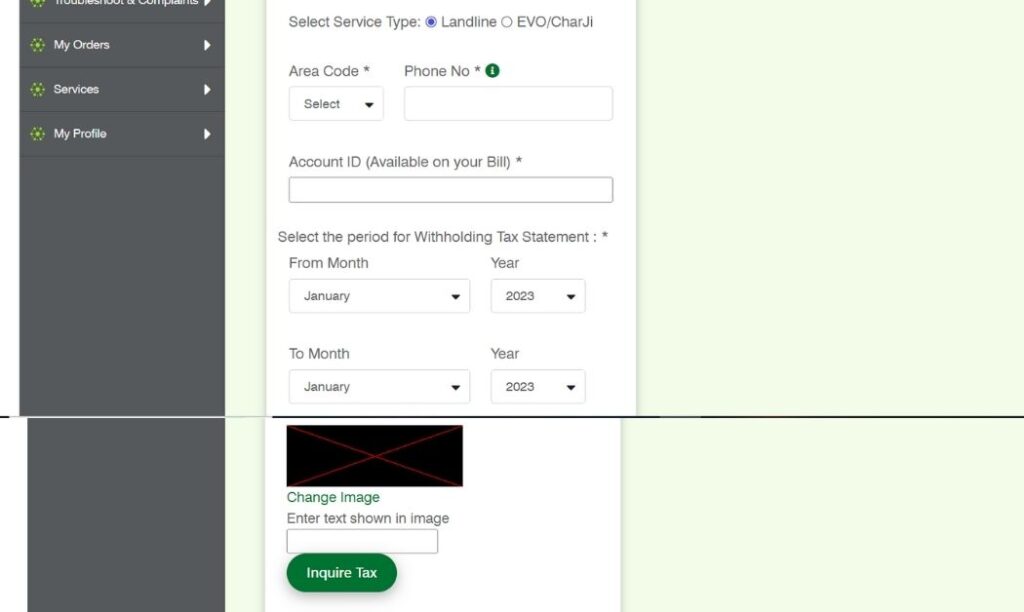
Steps:
- Open the PTCL Withholding Tax Statement page
- Select “Landline” as the service type
- Enter your area code and phone number
- Provide your Account ID (available on your PTCL bill)
- Select the required tax period
- Tax Year 2025:
- Start Date: 1 July 2024
- End Date: 30 June 2025
- Tax Year 2025:
- Enter the captcha code
- Click on “Inquire Tax”
- Your tax certificate will appear on the screen
- Save or download it in PDF format
This certificate shows the exact tax deducted from your landline bills during the selected period.
PTCL EVO / Charji Tax Certificate
PTCL EVO and Charji users can also download their withholding tax certificate online by following a similar process.
Steps:
- Visit the PTCL Withholding Tax Statement page
- Select “EVO / Charji” as the service type
- Enter your MDN number
- Enter ESN / ICCID (available on your device or SIM)
- Provide your CNIC or NTN
- Select the required tax period
- Tax Year 2025: 1 July 2024 to 30 June 2025
- Enter the captcha
- Click “Inquire Tax”
- Download the displayed certificate in PDF format
Make sure all details are entered correctly to avoid errors.
Using PTCL Tax Certificate for Income Tax Return
The tax deducted by PTCL is a withholding tax under Pakistani tax laws. This tax is adjustable when filing your income tax return through the FBR IRIS portal.
When filing your return:
- Keep the PTCL tax certificate saved as a record
- Declare the deducted amount in the withholding tax section
- This helps reduce your overall tax liability or supports refund claims
Common Issues & Helpful Tips
- Always keep required details ready, such as Account ID, MDN, or ESN/ICCID
- Select the correct tax year; otherwise, the certificate may be inaccurate
- If the captcha does not appear:
- Change your internet connection, or
- Try using a VPN
- If the issue continues, contact PTCL Customer Support
Final Words
Downloading your PTCL tax certificate is a simple and official process. Whether you use WhatsApp, a landline, or EVO/Charji service, PTCL provides easy access to your withholding tax details.
By keeping your certificate saved and updated, you can file your income tax return smoothly and stay compliant with Pakistani tax laws.
(FAQs)
Can I download my PTCL tax certificate online?
Yes. You can download your PTCL tax certificate online through the PTCL website or receive it directly via PTCL’s official WhatsApp service.
What is the tax year for the PTCL tax certificate 2025?
Tax Year 2025 covers the period from 1 July 2024 to 30 June 2025. Make sure you select this period to get the correct certificate.
Is the PTCL withholding tax adjustable in the income tax return?
Yes. PTCL deducts withholding tax, which is adjustable while filing your income tax return through the FBR IRIS portal.
Can I download the PTCL tax certificate for previous years?
Yes. PTCL allows users to download tax certificates for previous tax years, provided the record is available in their system.
What details are required to download the PTCL tax certificate?
You may need your CNIC or NTN, Account ID (for landline), or MDN and ESN/ICCID (for EVO or Charji), depending on your service type.
What should I do if the PTCL tax certificate does not appear?
Double-check your entered details, try a different internet connection, refresh the captcha, or contact PTCL customer support if the issue continues.
Is a PTCL tax certificate required for non-filers?
Yes. PTCL still deducts tax from non-filers. The certificate can be kept for record or used later if you decide to file your tax return.
Can I use the PTCL tax certificate as proof of tax payment?
Yes. The PTCL tax deduction certificate serves as official proof of tax deducted from your PTCL bills.