How To Download Telenor Tax Certificate
If you are a Telenor prepaid or postpaid user in Pakistan, income tax is automatically deducted every time you recharge your balance or pay your postpaid bill. This deducted amount is not final tax. It is an adjustable withholding tax, which you can claim while filing your FBR income tax return.
To claim this amount, you need a Telenor tax certificate.
In this guide, you’ll learn how to download the Telenor tax certificate, all available methods, how to use it in FBR IRIS, and common issues faced by users.
What Is a Telenor Tax Certificate?
A Telenor tax certificate is an official document issued by Telenor Pakistan that shows the income tax deducted on your mobile usage during a specific tax year.
The certificate usually includes:
- Registered mobile number
- CNIC of the SIM holder
- Relevant tax year
- Total withholding tax deducted
- Tax deducted under Section 236 of the Income Tax Ordinance
This certificate acts as proof when you claim mobile withholding tax in your tax return.
Why You Need a Telenor Tax Certificate for FBR Filing
Many users ignore mobile tax deductions, but over a year, this amount can be significant.
With a Telenor tax certificate, you can:
- Claim adjustable tax in FBR IRIS
- Reduce your overall income tax liability
- Avoid losing already paid tax
- Support refund claims (if applicable)
Only active tax filers can adjust this tax while filing their return.
How to Download Telenor Tax Certificate Online (All Methods)
Telenor offers three easy ways to get your tax certificate: online via app, customer care, or franchise visit.
Method 1: Download the Telenor Tax Certificate via the My Telenor App
This is the fastest and most convenient method.
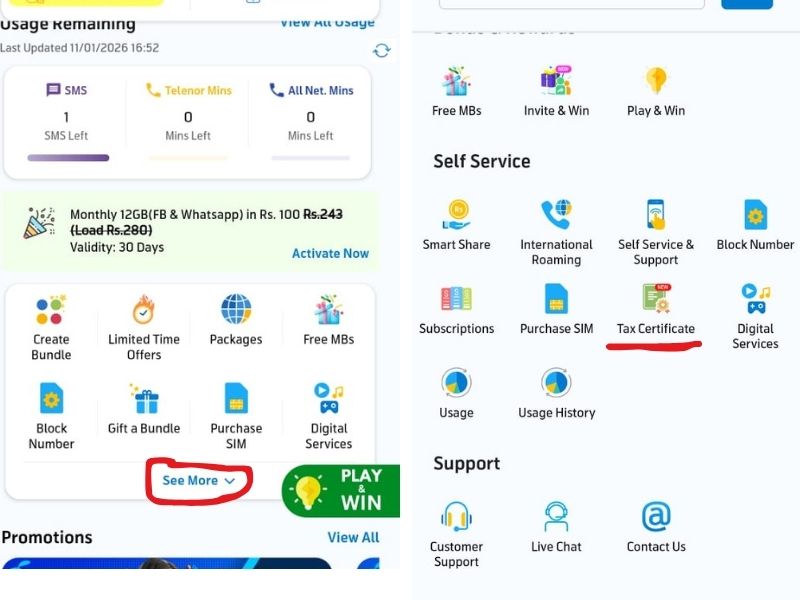
- Download the My Telenor App from the Google Play Store or the Apple App Store
- Log in using your Telenor mobile number
- Tap “See More” → “Self Services.”
- Select “Tax Certificate”
- Enter your CNIC number, email address, and required tax year
- Download the certificate or receive it via email
You can usually download tax certificates for the last three tax years.
Method 2: Get Telenor Tax Certificate Through Customer Care
If the app is not accessible, you can request the certificate by calling customer support.
Contact details:
- Dial 345 from your Telenor number
- Or call 042-111-345-100 from any network
Process:
- Request a tax certificate from the representative
- Complete identity verification
- Provide scanned copies of CNIC (front and back if required)
- Share your email address
The certificate is generally emailed within a few minutes.
Method 3: Visit Telenor Franchise or Service Center
Users who prefer offline assistance can visit a nearby Telenor franchise.
Required documents:
- Original CNIC
- Telenor SIM registered on the same CNIC
The staff will generate and either print or email your Telenor withholding tax certificate.
Comparison: Which Method Is Best?
| Method | Speed | Convenience | Best For |
|---|---|---|---|
| My Telenor App | Very Fast | High | Most users |
| Helpline | Fast | Medium | App issues |
| Franchise | Medium | Low | Verification problems |
The app method is recommended for quick processing.
How Much Tax Is Deducted on Telenor SIM?
For active tax filers and non-filers, mobile tax rates may differ.
Example Calculation:
If you recharge Rs. 1,000 per month:
- Approx tax deduction (filers): around 10–15%
- Annual recharge = Rs. 12,000
- Estimated yearly tax deduction = Rs. 1,200 to Rs. 1,800
Over time, this becomes a significant adjustable amount.
Many taxpayers lose this money simply because they never download their tax certificate.
How to Get a Telenor Tax Certificate for Tax Year 2025 or 2026
When selecting the tax year, remember:
- Tax Year 2025 → Income from July 2024 to June 2025
- Tax Year 2026 → Income from July 2025 to June 2026
Always choose the same tax year that you are filing in FBR IRIS to avoid errors.
Which Telenor Users Can Download a Tax Certificate?
The Telenor tax certificate is available for:
- Prepaid users
- Postpaid users
- Business and corporate SIM users
If multiple SIMs are registered on one CNIC, each number requires a separate tax certificate.
How to Use Telenor Tax Certificate in FBR IRIS
While filing your income tax return on FBR IRIS:
- Go to Withholding / Adjustable Taxes
- Select Section 236 – Mobile Phone Usage
- Enter the tax amount shown on your Telenor tax certificate
This amount is adjusted against your payable tax and reduces your final liability.
Common Problems and Their Solutions
Certificate not received via email
→ Check spam folder or contact 345 for re-sending
Wrong tax year selected
→ Request the certificate again with the correct tax year
Old or inactive SIM
→ Visit a Telenor franchise with CNIC
Tax certificate option missing in app
→ Update the My Telenor App or use customer care
FAQs
What is a Telenor tax certificate?
It is a document showing the income tax deducted from your mobile usage during a tax year.
Can non-filers download the Telenor tax certificate?
Yes, but only tax filers can adjust the tax in FBR returns.
How many years of tax certificates are available?
Usually, the last three tax years are available.
Is the Telenor tax certificate free?
Yes, it is provided free of cost.
Do I need separate certificates for multiple SIMs?
Yes, each Telenor number has its own tax record.
How long does it take to receive the certificate?
Via app or helpline, it is often received within minutes.
Final Thoughts
Downloading your Telenor tax certificate is a small step that can make a real difference in your income tax return. Many taxpayers unknowingly lose adjustable tax every year simply because they don’t claim mobile withholding tax.
Whether you use the My Telenor App, customer care, or a franchise visit, make sure to collect your certificate before filing your return and include it in FBR IRIS.