How to Download Zong Tax Certificate Online – Step-by-Step
Getting your Zong tax certificate is an important step if you want to accurately file your income tax return in Pakistan. Every time you recharge your Zong SIM or pay a postpaid bill, a certain amount of withholding tax is deducted by the telecom operator.
This deducted tax can be adjusted in your annual return, but only if you have a valid Zong tax certificate as proof. Many users are unaware that this certificate is available online and free of cost. In this guide, you’ll learn how to get your Zong tax certificate online, using simple methods such as the My Zong App, official portal, or customer support, without any hassle.
What Is a Zong Tax Certificate?
A Zong tax certificate is an official document issued by Zong that shows the withholding tax deducted from your mobile usage during a specific tax year.
This document is also commonly called:
- Zong tax deduction certificate
- Withholding tax certificate Zong
The tax mentioned in this certificate is adjustable, meaning you can claim it when filing your income tax return with FBR.
Who Can Download a Zong Tax Certificate?
You can download your Zong tax certificate if:
- You are a Zong prepaid user
- You are a Zong postpaid user
- Your SIM is registered on your CNIC
- You file income tax returns as an individual, freelancer, trader, or salaried person
There is no fee for downloading the certificate.
How to Download Zong Tax Certificate Using My Zong App (Step-by-Step)
This is the fastest and easiest way to get your certificate.
Step 1: Install and Log in to My Zong App
- Download My Zong App from Google Play Store or Apple App Store
- Log in using your Zong mobile number and verification code
Step 2: Find the Tax Certificate Option
- Open the main menu or account section
- Look for “Tax Certificate” or “Billing / Tax” present at home page of the app
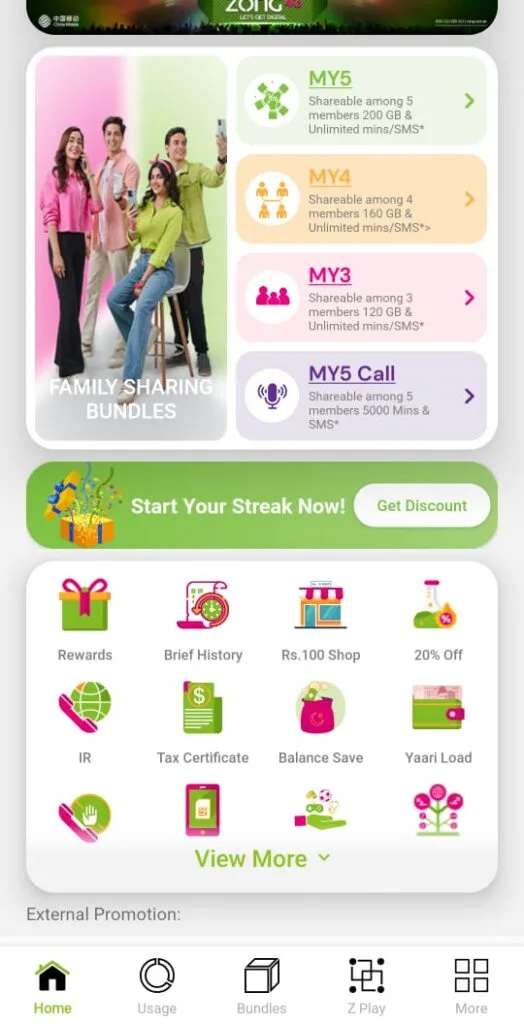
Step 3: Select the Tax Year
- Choose the required financial year (July 1 to June 30)
- Usually, the latest tax year is available
Step 4: Download the Certificate
- Tap on Download
- Your Zong tax certificate online will be saved as a PDF file on your phone
Tip: Save the PDF in a secure folder or email it to yourself for future use.
Download Zong Tax Certificate Online from Zong Website
If the app is not working, you can use the Zong customer portal.
- Visit the official Zong website
- Log in to My Zong / Customer Portal
- Go to the Billing or Tax Certificate section
- Select the tax year and download the PDF
This method is useful for users who prefer desktop access.
How to Get a Zong Tax Certificate via Helpline or Service Center
Zong Helpline (310)
- Dial 310 from your Zong number
- Complete basic verification
- Request your withholding tax certificate Zong
- In some cases, it may be sent via email
Zong Customer Service Center
- Visit your nearest Zong service center
- Bring your original CNIC and SIM
- Request a tax deduction certificate
- They may provide a printed or digital copy
Prepaid vs Postpaid Zong Tax Certificate
| User Type | Tax Deducted | Certificate Available | Adjustable in Return |
| Prepaid | Yes | Yes | Yes |
| Postpaid | Yes | Yes | Yes |
Both prepaid and postpaid users can claim the deducted tax.
How to Use a Zong Tax Certificate in an Income Tax Return (FBR)
When filing your return through FBR IRIS:
- Go to Tax Deducted at Source
- Enter the amount shown in your Zong tax deduction certificate
- The amount will adjust against your payable tax
Even small amounts help reduce your overall tax liability.
Common Problems While Downloading Zong Tax Certificate
- Tax certificate option not visible in app
→ Update the My Zong App - Old tax year not available
→ Contact Zong helpline or service center - PDF not downloading
→ Check storage permissions - SIM not on your CNIC
→ Certificate will not show until ownership is corrected
Frequently Asked Questions (FAQs)
Is the Zong tax certificate free?
Yes, it is completely free.
Can I download older tax certificates?
Usually, only the latest tax year is available online.
Is prepaid mobile tax adjustable?
Yes, prepaid mobile tax is adjustable in income tax return.
Is a PDF certificate acceptable for FBR?
Yes, a digital PDF is valid for tax filing.
Final Thoughts
Downloading your Zong tax certificate online is simple and takes only a few minutes. This small document plays an important role in accurate tax filing and should always be saved before submitting your income tax return.
If you regularly file returns, keeping your withholding tax certificate Zong ready can save both time and money.